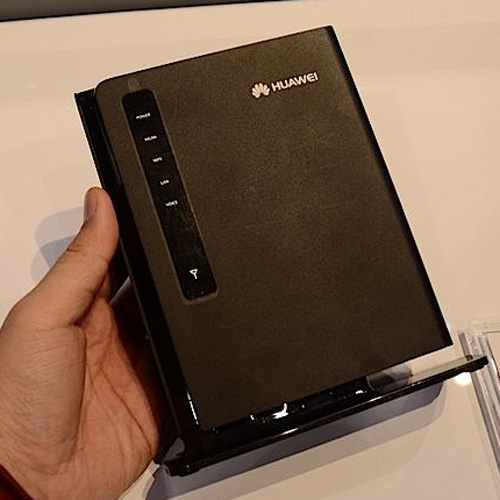
Recently Airtel has launched 4G network in metro cities and after that Airtel India launched various 4G modems and routers in India to browse the internet also. Today, I am sharing with you unlocking procedure of Airtel 4G LTE indoor wifi router gateway – Multi-mode Huawei B593.I have already provided unlocking solution of Airtel India Huawei E5573s-606 4G LTE Mobile Wifi Router. You can find out unlocking solution of Airtel B593 Multi Mode Modem at here.

HUAWEI B593 as the world”s first LTE TDD wireless broadband router, launched by Airtel in India for 4G Services. Airtel 4G LTE indoor wifi router gateway – Multi-mode Huawei B593 support LTE 4G/ 3G / 2G Multimode and LTE 100Mbps / 50Mbps @ 20M bandwidth. It comes with Internal Band LTE DD 800 / 900 / 1800 / 2100 / 2600 MHz, DL 2×2 MIMO and 4 Ethernet / Lan Ports for Non-Wifi Desktop Connectivity.Airtel 4G LTE indoor wifi router gateway – Multi-mode Huawei B593 supports WiFi 802.11b /g / n – N Series and at a time you can connect upto 32 devices in Wifi. VOIP Telephony , fax, printers and other office equipment can be connected with USB Connectivity to Airtel 4G LTE indoor wifi router gateway – Multi-mode Huawei B593.
The main features of Airtel 4G LTE indoor wifi router gateway – Multi-mode Huawei B593 is following :
Data download with unbelievably high speeds
VOIP: Voice over IP
Built-in DHCP Server and NAT
Security serve: Comprehensive and robust security services. Provides instant protection that blocks potential security risks and intrusion attempts
Intuitive and convenient web-based management
Local management and maintenance services for your gateway
The multi mode wifi router automatically switches to 4G/3G/2G depending on the available network
Users who are facing the problems while unlocking through above process can unlock his Airtel 4G LTE indoor wifi router gateway – Multi-mode Huawei B593 through FMC unlocker software.
HUAWEI B593 as the world”s first LTE TDD wireless broadband router, launched by Airtel in India for 4G Services. Airtel 4G LTE indoor wifi router gateway – Multi-mode Huawei B593 support LTE 4G/ 3G / 2G Multimode and LTE 100Mbps / 50Mbps @ 20M bandwidth. It comes with Internal Band LTE DD 800 / 900 / 1800 / 2100 / 2600 MHz, DL 2×2 MIMO and 4 Ethernet / Lan Ports for Non-Wifi Desktop Connectivity.Airtel 4G LTE indoor wifi router gateway – Multi-mode Huawei B593 supports WiFi 802.11b /g / n – N Series and at a time you can connect upto 32 devices in Wifi. VOIP Telephony , fax, printers and other office equipment can be connected with USB Connectivity to Airtel 4G LTE indoor wifi router gateway – Multi-mode Huawei B593.
The main features of Airtel 4G LTE indoor wifi router gateway – Multi-mode Huawei B593 is following :
Data download with unbelievably high speeds
VOIP: Voice over IP
Built-in DHCP Server and NAT
Security serve: Comprehensive and robust security services. Provides instant protection that blocks potential security risks and intrusion attempts
Intuitive and convenient web-based management
Local management and maintenance services for your gateway
The multi mode wifi router automatically switches to 4G/3G/2G depending on the available network
How to unlock Airtel 4G LTE indoor wifi router gateway – Multi-mode Huawei B593 ?
- Connect Airtel 4G LTE indoor wifi router gateway – Multi-mode Huawei B593 without sim to PC with RJ45 connector.
- Now open default browser Internet explorer in your PC and type in the address bar of your Internet Explorer.
- Login into your router.
- Now put the password as unlock code and click on Apply.
- Now your router will be rebooted and it is unlocked forever.
Users who are facing the problems while unlocking through above process can unlock his Airtel 4G LTE indoor wifi router gateway – Multi-mode Huawei B593 through FMC unlocker software.