Showing posts with label Unlock Modems. Show all posts

Thursday, October 27, 2016

How to Change APN Settings in Huawei Airtel e5573s-606 Mobile Wifi Router Hotspot Without Flashing or Updating Default Dashboard?

Posted by Unknown
Recently I posted about how to unlock huawei airtel e5573s-606 mobile wifi router hotspot. But Users are facing a problem that how to change the apn settings in huawei airtel e5573s-606 4g hotspot. so, here is the solution to change apn settings.

How to Change APN Settings in Unlocked Huawei Airtel e5573s-606 Mobile Hotspot WiFi Router

Requirements:

  • An Android Mobile Phone
  • Huawei Airtel Hotspot
  • Some Internet


How to Change APN Settings in Huawei Airtel e5573s-606 Mobile Wifi Router Hotspot ?

    Steps to Change APN Settings in Airtel's Huawei Mobile Hotspot Wifi Router:
    • First Download Hi Link App (Huawei Official Mobile App)  
    • Connect to Your Airtel Hotspot with Wifi in mobile & Open Hi Link App
    • Now Login (default username: admin & password: admin)
    • Now Go to Settings > Network > APN
    • Tap on "+" New & Create New APN
    • Enter the Name,APN & Save it & mark it as default. (for example: if you are using Reliance Jio Sim Card, then APN is jionet)
    If you are getting any problem. Please Write in below comment box & please like,share & comment.
    Read More

    How to Unlock Huawei E5577Cs-321 Mobile Hotspot Wifi Router of Optimus Portugal?

    Posted by Unknown 6 Comments

    Optimus carrier of Portugal is offering E5577Cs-321 router which carries WebUI 17.100.11.00.58. It comes with customized firmware and can be unlocked after changing the firmware.Unlocking of Huawei E5577s-321 locked to Zain Saudi Arabia and Viva Bahrain is also supported without boot shot. The firmware of E5577s model works on E5577cs device and unlocking is possible.

    Requirements:
    v4.25         v5.01

    Note: Make sure that your router is charged at-least 50%.


    Steps:
    • Connect your Huawei E5577Cs-321 router to pc or laptop via USB cable.
    • Make sure that your router is charged at-least 50%.
    • Open “My Computer / This PC” and you will find a virtual CD-ROM.
    • Open the virtual CD-ROM and install the drivers in your Windows computer.
    • Now default IP address of E5577Cs-321 router will be automatically opened.
    • If internet is connected then disconnect and close the browser.
    • Run the firmware 21.180.99.04.00.
    • It will ask you for password.
    • Generate flash code from universal master code tool or comment below with model and IMEI to get the firmware code.
    • Input the flash or firmware code in firmware update wizard when it will ask you for password.
    • Wait till successfully flashing the device.
    • Now install Huawei mobile partner in PC.
    • Run DC unlocker and detect the device under it.
    • Scan your Modem
    • Enter a Code AT^NVRDEX=50503,0,128 and Press Enter from your Keyboard.
    • Now it will show some nv codes.
    • Now Extract Hauwei Calculator New V4 and Open it.
    • Copy and Paste the Pattern 1 & Pattern 2 in Huawei Calculator New V4 as shown in below screenshots
    • Now again open the Huawei Master Code and See the Unlock Code (where you see flash code)
    • Paste in NCK/OEM Unlock Code
    • Click Calculate Code.
    • After Finishing it will the nck/oem unlock code.
    • then 192.168.X.X page will open in browser and asks for SIM LOCK CODE
    • enter the NCK/OEM Unlock Code in that and Unlock it.
    • That's it now you can use any sim card in your Huawei E5577Cs-321 hotspot.
    How to Unlock Huawei E5577Cs-321 Mobile Hotspot Wifi Router of Optimus Portugal?

    To Unlock This Device, You can Download The Premium Tutorial with All Error Solutions (error 19,error 10,error 17 etc.) PDF Tutorial

    NOTE: 1). The Tutorial will be Send Via Email Address

    Steps to Get Premium Unlock Tutorial:

    Get Premium Tutorial With Error Solutions At Lowest Price - Rs 499


        Don't able to understand please comment below or Buy the premium tutorial & Get Support from our expert
        Read More

        Tuesday, October 11, 2016

        How to Unlock STC E5172 4G LTE CPE E5172s-920 Huawei WiFi Router?

        Posted by Unknown
        Recently, I had written the article about unlocking of Saudi Arabia Zain E5172AS-22 WiFi router. Like other Huawei FMC routers, as I had mentioned in the unlocking of Huawei B683 (Orange Uganda), STC E5172s-920 (Saudi Telecom company) can not be unlocked. Other routers which come with USB port like E5331, E5332, E5776s, E5830, E583x, E585U-82, E585, E586, E587, E612/E618 and various other R series routers like R201, R210, etc can also be unlocked easily. But, to unlock STC E5172s-920 Huawei WiFi router, neither Huawei modem code writer nor CardLock Unlock tool software will work.
        How to Unlock STC E5172 4G LTE CPE E5172s-920 Huawei WiFi Router?

        Huawei E5172s-920 WiFi router can not be unlocked with FMC unlocker software too.

        How to Unlock STC (Saudi Telecom Company) Huawei E5172s-920 LTE CPE Router Gateway?

        1. Reset the device and connect to Windows PC with its default LAN cable.

        2. Browse its default IP address (192.168.1.1) from the Internet Explorer.

        3. Login to device dashboard with admin username and password.

        4. Go to the Settings.

        5. Search option for SIMLock / NCK.

        6. Enter here correct 8-digit unlock code / NCK.

        7. Click Apply.

        Now, the device should automatically reboot and show the network of inserted SIM card. If not then, reset the device from its reset button. You should be able to see the network now. Configure the profile according to the new SIM card and make it default. Now you should be able to browse the internet.

        Note : Don’t use any wrong / free codes into STC Huawei E5172s-920 Huawei WiFi router gateway, otherwise it will be locked permanently. 
        Read More

        Saturday, September 24, 2016

        How to Solve Error 19 in Airtel's Huawei E5573s-606 Mobile Hotspot WiFi Router?

        Posted by Unknown
        Many users facing an error 19 to unlock Airtel e5573s-606 Mobile Hotspot Wifi Router that i read in the comments of my previous Airtel's Huawei e5573s-606 Mobile Hotspot Wifi Router Post. So, here is the solution for error 19.
        How to Solve Error 19 in Airtel's Huawei E5573s-606 Mobile Hotspot WiFi Router?

        How to Solve Error 19 in Airtel's Huawei E5573s-606 Mobile Hotspot WiFi Router?

        NOTE: 1). The Tutorial will be Send Via Email Address

        Steps to Get Premium Unlock Tutorial:

        • Find Your Firmware Version, Go to Your Airtel 4G Hotspot settings page (eg. 192.168.8.1) Settings >> System (From Side Tabs) >> Device Information & See the Software Version is like: v21.180.**.**.** then buy v21.180.**.**.**  OR if Software Version is v21.315.**.**.** then buy v21.315.**.**.** 
        • Buy Airtel Premium Unlock Tutorial From Below Shopping Portals.
        For Old Firmware (v21.180.**.**) - Rs 399

        For Old Firmware (v21.315.**.**) - Rs 499


        OR

        Reason For Error: Error 19 may caused if the other application or service is using your modem.


        Solution For Error 19:

        • Error Code 19, means your modem ports is using by any application or services.
        • First of all close dashboard and disconnect the internet if using same modem.
        • Open Task manager.
        • Click Processes
        • Now Find This Three Processes
        • HWDeviceService.exe
        • DCService.exe
        • MobileBroadband.exe ( Vodafone Mobile Broadband Service )
        • UIExec.exe ( UI Assistant Service )

        Right click and click Kill Process Tree for this processes Then Try Firmware Update.
        Read More

        Thursday, September 22, 2016

        How to Change APN Settings in Unlocked Huawei Airtel e5573s-606 Mobile Hotspot WiFi Router ?

        Posted by Unknown
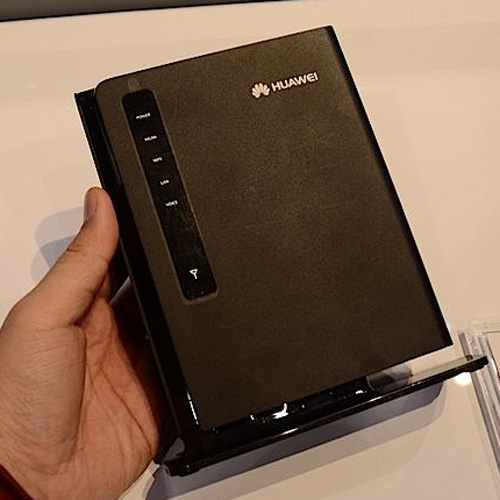
        If you have a Unlocked Airtel's Huawei Mobile Wifi Hotspot e5573s-606, Then you will not be able to use for some sim cards (like: Reliance Jio) as Your Airtel Hotspot didn't know Reliance Jio APN (Access Point Name) & Also you are not able to enter APN manually in APN Settings (in Huawei Airtel Hotspot Settings Page). So, I have a solution to overcome this Problem.
        How to Change APN Settings in Unlocked Huawei Airtel e5573s-606 Mobile Hotspot WiFi Router

        Requirements:

        • An Android Mobile Phone
        • Huawei Airtel Hotspot

        How to use Reliance Jio Sim Card in Airtel's Huawei Mobile Hotspot Wifi Router?

        Steps to Change APN Settings in Airtel's Huawei Mobile Hotspot Wifi Router:

        • First Download Hi Link App (Huawei Official Mobile App) 
        • Connect to Your Airtel Hotspot with Wifi in mobile & Open Hi Link App
        • Now Login (default username: admin & password: admin)
        • Now Go to Settings > Network > APN
        • Tap on + New & Create New APN
        • Enter the Name,APN & Save it & mark it as default. (if you are using Reliance Jio Sim Card, then APN is jionet)
        If you are getting any problem. Please Write in below comment box & please like,share & comment.
        Read More